
Microsoft 365 Administration
Microsoft 365 Service Ecosystem
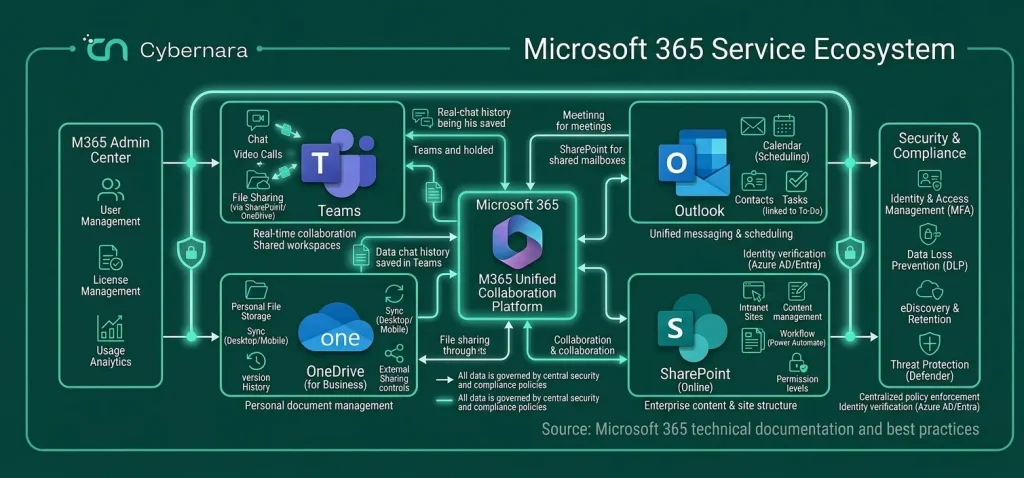
How Small M365 Misconfigurations Become Big Problems
Microsoft 365 issues rarely start as major failures. They begin as small misconfigurations a permission here, a missed policy there that quietly grow into bigger risks over time.
Permissions Grow Without Control
Users get access over time, but rarely lose it. Old roles, shared mailboxes, and elevated privileges accumulate, creating unnecessary exposure across your environment.
Security Settings Drift Over Time
MFA gets inconsistently applied, policies are partially configured, and exceptions are made without tracking. What starts as a temporary change becomes a permanent gap.
Unused Accounts Stay Active
Dormant users, ex-employees, and inactive service accounts often remain enabled. These accounts become easy entry points because no one is actively monitoring them.
Sharing Gets Out of Hand
Files and folders are shared externally or across teams without visibility. Sensitive data slowly spreads beyond its intended boundaries without anyone noticing.
Configurations Don’t Match Business Needs
Default settings are left untouched or poorly adjusted. As your business evolves, your Microsoft 365 environment doesn’t creating friction and risk.
No One Owns the Environment Fully
Responsibility is split across teams or handled reactively. Without clear ownership, small issues go unnoticed until they cause real impact.
Where Microsoft 365 Actually Runs Your Business Operations
Exchange Online and Email Systems
SharePoint and OneDrive Storage
Microsoft Teams and Collaboration Tools
Identity and Azure AD (Entra ID)
Device and Endpoint Integration
Third-Party Integrations and Apps
Clients Who Trust Us







How Cybernara Cleans Up and Stabilizes Your M365 Environment
Full Environment Assessment and Mapping
Permission and Access Cleanup
Security Policy Alignment
Standardization Across Services
Monitoring and Ongoing Administration
Business Risks Associated with Unmanaged Microsoft 365 Systems
When Microsoft 365 is not properly managed, problems rarely appear overnight. They build gradually over time, eventually affecting security, operations, and overall business reliability.
Unauthorized Access and Data Exposure
Excessive permissions, weak access controls, and unmanaged file sharing increase the risk of sensitive information being exposed or accessed by the wrong people.
Account Compromise and Identity Risks
Without strong authentication and continuous monitoring, user accounts become vulnerable to attacks. A single compromised account can create risks across the entire environment.
Data Sprawl and Loss of Visibility
Files and information spread across Teams, SharePoint sites, OneDrive accounts, and external users without proper oversight. Over time, it becomes difficult to know where important data is stored or who has access to it.
Operational Disruptions
Misconfigured email settings, Teams policies, or access controls can interrupt daily business operations. Small configuration issues can quickly grow into larger service disruptions.
Compliance and Audit Challenges
Inconsistent governance, missing logs, and poorly managed policies create gaps that become major concerns during audits or compliance reviews.
Increased IT Workload and Reactive Support
Without structured administration, IT teams spend more time responding to problems instead of preventing them. Support becomes reactive, inefficient, and difficult to scale.
Services Our Clients Trust Us With
Our Core Services
IT and Infrastructure Services
Cloud and Platform Services
Security and Compliance Services
Development, Data and AI Services
Protect Your Data, People & Business From Threat Attacks
Get Started With A Free Security Audit
FAQs
How long does it take to stabilize a Microsoft 365 environment?
Most environments start seeing improvements within the first few weeks. Full optimization, including security hardening and policy alignment, typically takes 60 to 90 days depending on complexity.
Do we need to migrate or rebuild our existing setup?
No. We work with your current Microsoft 365 environment, identify gaps, and improve it step by step. There’s no need for a full rebuild unless absolutely necessary.
Can you handle both security and administration together?
Yes. Administration and security are tightly connected in Microsoft 365. We manage both — from user lifecycle and permissions to security policies and compliance settings.
Is this useful for small teams or only large organizations?
Both. Smaller teams benefit from structured management without needing in-house expertise, while larger organizations gain control over complex, multi-user environments.