
DPDP Incident and Breach Response
DPDP Incident and Breach Response helps businesses handle data incidents in a calm, structured, and practical way. It focuses on guiding teams through the steps needed when personal data is accidentally exposed, accessed, or mishandled. The goal is to help organisations respond quickly while keeping communication and operations clear.
DPDP Support covers assessment, coordination, and practical action so teams know what to do when an incident occurs. This helps businesses recover confidently and strengthen processes for the future.

Download the DPDPA Guide
DPDPA can feel overwhelming when read as a legal document.
We simplified the Act, its obligations and penalties, into easy-to-understand guide for business team
DPDP Act FAQs for Businesses
Most businesses have the same questions about DPDPA. Does it apply to us? What about WhatsApp?
This PDF answers the most common, real-world questions in plain language.
What Counts as a DPDP Incident?
Most DPDP incidents come from normal business activities. Clear awareness helps teams identify and address issues before they grow. Here are the most common security issues that causes DPDP incidents.
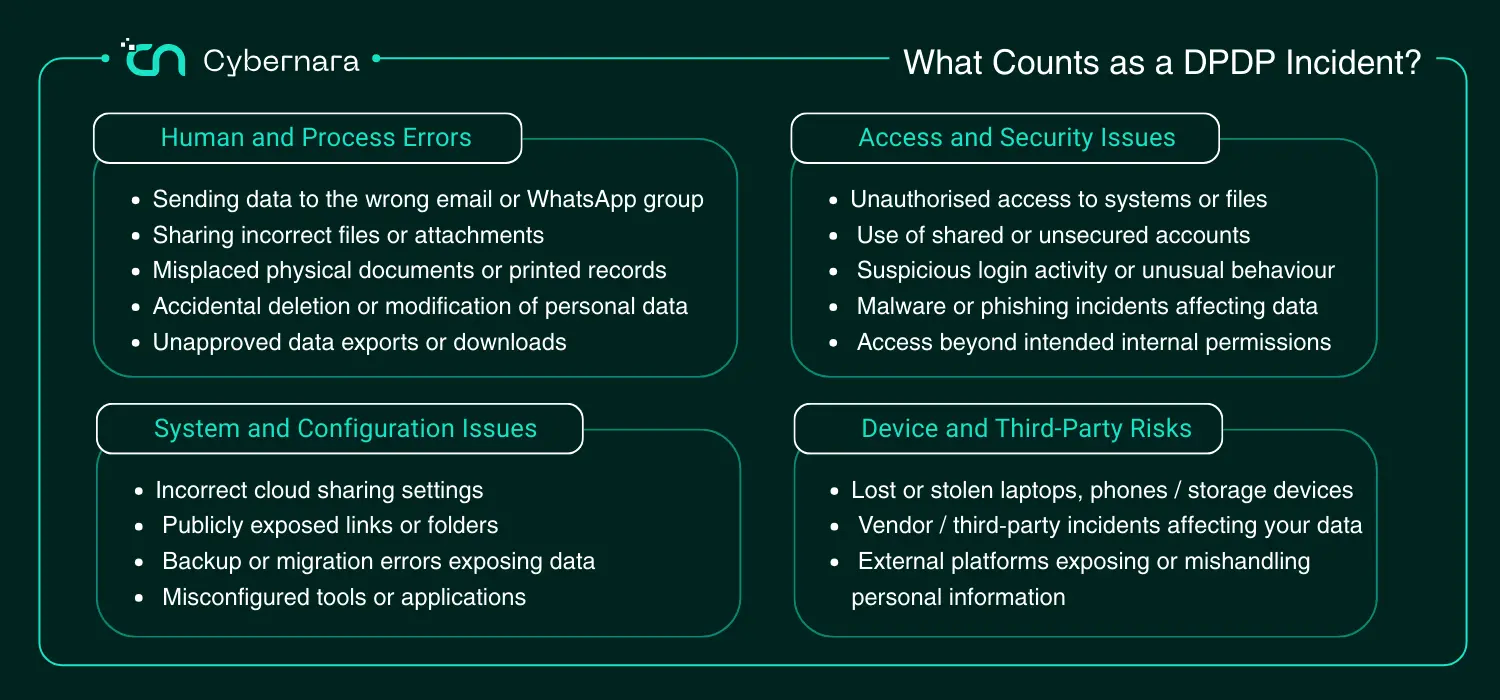
Understanding What Counts as a DPDP Incident
A DPDP incident is any situation where personal data is accessed, shared, lost, or handled in a way that was not intended. These situations are often operational mistakes or system issues rather than deliberate actions. Many incidents happen during everyday business activities and are noticed only after teams review workflows. Understanding what counts as an incident helps businesses respond calmly and early.
Accidental Sharing of Personal Data
Sometimes data is sent to the wrong email address, shared in the wrong group, or attached to the wrong message. These mistakes can happen during routine communication and may still count as incidents.
Unauthorised Access to Systems or Files
If someone accesses data without proper permission, whether internally or externally, it may be considered an incident. This can include shared accounts, weak access controls, or unexpected login activity.
Lost or Misplaced Devices and Files
Laptops, mobile phones, or storage drives containing personal data can be lost or stolen. Even misplaced physical documents or exported spreadsheets may create data exposure risks.
Incorrect Configuration of Tools or Platforms
Cloud storage links, shared folders, or app settings sometimes allow wider access than intended. These technical misconfigurations are a common source of accidental exposure.
Vendor or Third-Party Data Issues
Many businesses rely on external platforms for payroll, marketing, or customer management. If a vendor experiences a data issue affecting your information, it may still be treated as a DPDP incident.
Recognising what counts as a DPDP incident helps businesses react early and stay organised when issues occur. Clear understanding makes response faster and reduces confusion during stressful moments.
Which Teams Do We Work With During DPDP Incident Response
IT and Security Teams
IT and security teams help identify what happened, contain the issue, and review system activity. Their technical insight helps clarify how the incident occurred and what immediate steps are needed.
Operations Teams
Operations teams understand how data is used in everyday workflows. They help identify affected processes and support quick operational adjustments during response.
Leadership and Management
Management teams help guide decisions, prioritise actions, and coordinate communication across the organisation. Their involvement helps keep responses aligned with business continuity.
HR Teams
If employee information is involved, HR teams support data review and internal communication. They help ensure employee-related processes remain clear during the response.
Incident response works best when teams collaborate with clear roles and shared understanding. Bringing the right people together helps businesses respond efficiently while keeping operations stable.
Clients Who Trust Us







Recommended Immediate Actions After DPDP Incident Is Detected
The first few hours after a data incident are usually focused on gaining clarity and preventing further impact. The goal is not to rush decisions but to take calm, organised steps that help teams understand what happened. Clear early actions reduce confusion and help everyone work together effectively. Simple coordination at this stage makes the rest of the response smoother.
Contain the Situation Quickly
The first priority is to limit further exposure. This may include restricting access, pausing affected systems, or securing shared links and accounts until the situation is understood.
Inform the Right Internal Teams
Key teams such as IT, operations, and leadership should be informed early so responsibilities are clear. Early coordination helps avoid duplicate actions or missed steps.
Identify What Data Might Be Affected
Teams should begin reviewing what type of personal data may be involved and where it was stored or shared. This helps shape the next response decisions.
Preserve Logs and Evidence
System logs, emails, or activity records should be kept intact so the incident can be reviewed properly. Preserving information helps build a clear timeline later.
Pause Risky Activities if Needed
If certain workflows or tools contributed to the incident, temporarily pausing them can prevent additional exposure while assessments continue.
Start a Simple Incident Record
Documenting key actions and timestamps from the beginning helps teams stay organised. Even a basic tracker can support clear communication during response
Taking clear and practical steps immediately after detection helps businesses move from uncertainty to structured response. Early organisation creates a stable foundation for the rest of the incident handling process.
How Cybernara Team Helps with DPDP Incident and Breach Response
Helping Teams Understand the Situation
The first step is helping teams gather clarity around what happened and where data may be affected. This reduces uncertainty and helps everyone work from the same understanding.
Supporting Early Response Actions
Cybernara helps teams prioritise immediate steps such as containment, access checks, and operational coordination. The focus is on practical actions that can be taken quickly.
Coordinating Across Departments
Incident response often involves IT, operations, leadership, and communication teams. Cybernara helps align these groups so information flows smoothly and actions stay organised.
Guiding Communication Planning
Clear communication is important during incidents. The team helps businesses prepare structured internal and external communication based on the situation.
Assisting with Incident Documentation
Keeping simple records of timelines, decisions, and actions helps maintain clarity during response. Cybernara supports teams in documenting activities in an organised way.
Cybernara’s role during incident response is to support businesses with structured guidance and coordination. This helps teams stay focused, organised, and confident while managing challenging situations.
Services Our Clients Trust Us With
Our Core Services
IT and Infrastructure Services
Cloud and Platform Services
Security and Compliance Services
Development, Data and AI Services
FAQs
What is considered a DPDP incident or breach?
A DPDP incident can include accidental sharing of personal data, unauthorised access, lost devices, incorrect system settings, or vendor-related issues that affect personal information. Many incidents happen during normal operations and are not always caused by malicious intent.
Do all incidents need the same level of response?
No. Some incidents are minor and resolved quickly, while others may require broader coordination and communication. The response usually depends on the type of data involved and the potential impact.
How does incident response help after the issue is resolved?
After an incident, teams review what happened and update processes where needed. This helps strengthen operations and reduce the chances of similar situations happening again.
Making Teams Compliant Since 2019
Get Started With a DPDP Readiness Check
Got Data?
Got Infra?
Got Cloud?
We protect it all.
Security that works actively in the background.
Cloud • Infrastructure • Platforms • APIs • Networks • Data • Applications • Endpoints • Identities • Workloads • Logs • Access • Integrations • Storage • Environments • Logs