
What Is Data Leak Prevention (DLP)
Our Data Leak Prevention (DLP) Services Are global and Available In Multiple Countries
Number Of Data Leaks By Country
The US leads by a massive margin in total leaked data points, followed by Russia and China.
These numbers show how large populations, digital adoption, and higher attack volumes drive long-term exposure across nations.

Where Data Actually Leaks From in Modern Businesses
Most organizations imagine data leaks as dramatic events — a hacker breaking in, a system taken over, or a database dumped overnight. But in the real world, leaks rarely look like attacks. They look ordinary. They hide inside daily work, routine habits, small shortcuts, and moments of convenience.
Data leaves not because someone broke in, but because someone let it walk out without noticing. DLP matters because businesses don’t lose information through explosions — they lose it through slow drips.
Email and Messaging
Employees forward files to personal email, reply-all with attachments, or share screenshots in chat that quietly contain customer data, credentials, or financial details.
Cloud Storage and File Links
Sharing “anyone with the link” access on Drive, SharePoint, or Dropbox turns private documents into publicly accessible data if the link leaks or is guessed.
SaaS Apps and Shadow IT
Teams upload exports into unapproved tools for analytics, automation, or collaboration without security review, spreading sensitive data across platforms no one is monitoring.
Laptops, USBs, and Personal Devices
Data is copied to USB drives, downloaded to personal laptops, or synced to phones and tablets where there is little to no corporate visibility or control.
Third Parties and Ex-Employees
Vendors, interns, and contractors often retain access longer than needed, and departing employees may take documents, code, or contact lists with them.
Internal Access That Never Gets Cleaned Up
Employees change roles, move teams, or leave organizations — but their access often stays. Over-permissioned accounts become quiet gateways for unwanted data movement.
Data slips out through familiar paths — the tools people use, the shortcuts they take, and the systems that were never meant to store sensitive information. DLP exists to watch those everyday exits and close the ones no one sees happening.
Why Data Leaks Still Happen Even With Security Toolsurely
Security Tools Protect the Perimeter, Not the Content
Authorized Users Can Still Move Data Anywhere
Mistakes Look Identical to Normal Workflows
Shadow IT Slips Past Every Traditional Control
Remote Work Expanded the Attack Surface to Living Rooms
Security Tools Don’t Understand Human Behavior
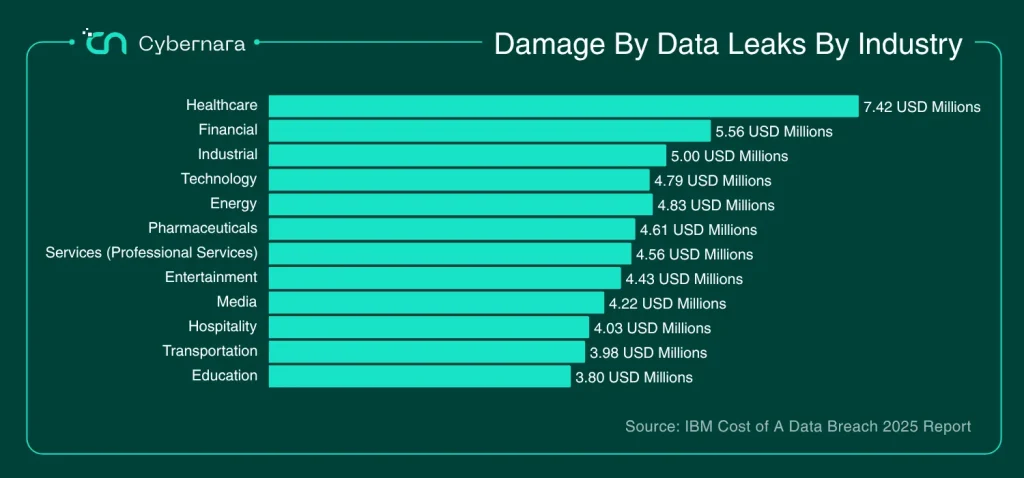
Damage By Data Leaks By Industry
Healthcare, finance, and industrial sectors continue to face the highest financial impact from data breaches — with healthcare far ahead of all others. The costs reflect how sensitive data, complex systems, and regulatory pressure amplify the damage when leaks occur.
Clients Who Trust Us







How Cybernara’s DLP Team Fits Into Your Security Stack
Policy & Classification Alignment
Endpoint, Cloud, and SaaS Coverage
Real-Time Monitoring & Response
Integration With Existing Security Tools
Continuous Tuning & User Education
What Good DLP Policies Look Like in Real Life
Strong DLP is about guiding how sensitive data should move across the business. Good DLP policies feel natural to employees, protect data automatically, and only interrupt when something genuinely risky happens.
Sensitive Files Require Justification
When someone tries to email customer records, financial reports, or source code externally, they must provide a reason — and the action is logged for review.
Restricted Sharing on Cloud Storage
Google Drive, OneDrive, and SharePoint block “anyone with the link” sharing by default. Sensitive folders only allow access to approved teams or roles.
USB and External Devices Are Monitored or Blocked
Employees can’t copy large volumes of files onto removable drives without approval. Suspicious transfers are automatically flagged.
Data Labels Drive the Controls
Files tagged “Internal,” “Confidential,” or “Restricted” automatically trigger the correct rules — encryption, watermarking, sharing limits, or download controls.
Bulk Downloads Trigger Alerts
If someone pulls hundreds of files suddenly — customer lists, product documents, HR data — the system immediately alerts or stops the action.
Email Filters Catch Sensitive Content
Sending credit card numbers, IDs, financial data, or health information outside the company is automatically blocked or requires manager approval.
Departing Employees Get Elevated Monitoring
Employees who have resigned or switched roles get stricter controls, ensuring no sensitive data leaves during transition.
Services Our Clients Trust Us With
Protect Your Data, People & Business From Threat Attacks
Get Started With A Free Security Audit
FAQs
Is DLP just a tool that blocks risky actions?
No. Good DLP is more about guidance than blocking. It watches how data moves, understands the context, and steps in only when something looks unsafe. Most of the time, it nudges instead of stopping work.
Can DLP prevent both accidental and malicious data leaks?
Yes. Whether someone mistypes an email or intentionally uploads data to a personal drive, DLP monitors the movement and reacts. It catches mistakes, and it detects intent.
Will DLP block my employees and slow down work?
Not when done properly. Good DLP policies allow normal workflows and only intervene when an action is genuinely risky.
Is DLP too complex for small and mid-size businesses?
Not anymore. Cloud-native DLP solutions are easier to deploy, require less infrastructure, and scale with your size.